
Summer 2026 Updates - Live Session Logging, Climb Tags, and New Grade Scales
 PK
PKPeter Klimek
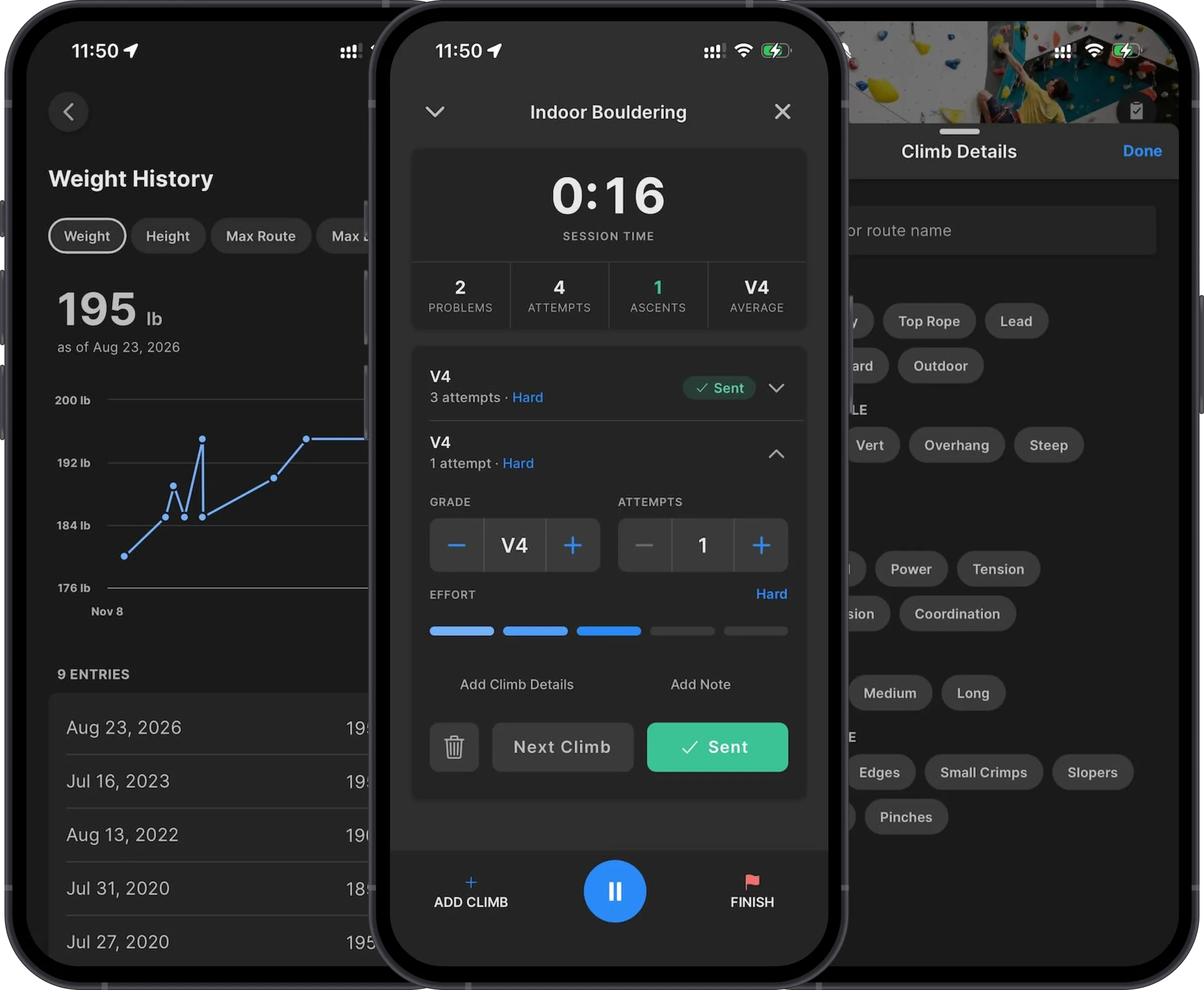
Four releases have gone out since June, 8.1 through 8.4, and rather than a post for each, here's one catch-up on all of it. The theme of the summer, if there is one: logging your climbing got a lot better.
Session logging
The biggest addition is a live mode for open climbing sessions (8.3). Tap Start Session on the open climbing card and a stopwatch starts running. You log each problem as you finish it — grade, attempts, how hard it felt, sent or not, and other problem metadata instead of having to log it all after the fact. The session header keeps a live count of problems, attempts, ascents, and your average grade while you work through the day. You can also minimize the session to a banner and use the rest of the app while it runs. When you end the session, the usual review screen shows everything you logged so you can fix anything before it saves.
Route/problem tags
The 8.3 release also introduced route/problems tags. This allows you to capture where you climbed (gym, spray wall, outdoor, top rope, lead, and so on), which board and layout (Kilter, Tension, MoonBoard, etc.), wall angle, style, length, and hold types. The location tags carry over from one climb to the next, so tagging a board session means picking the board once and just logging climbs after that.
For now the tags and names appear on your logged climbs in the logbook. We are planning to introduce a revamped Analytics screen this fall, so this feature lays the groundwork for that.
UIAA and Ewbank grades
Climbers in Germany, Australia, or New Zealand rejoice — the app finally speaks your (grade) language. Route grades can now be shown in UIAA or Ewbank. Pick the scale in settings or onboarding and it will be the default choice in logging, charts, and assessments.
Logging refinements
In-session logging shipped with 8.0, and the feedback since has driven a steady series of improvements:
- Per-set effort. You can rate how hard each set felt as you finish it.
- Workout-level effort. We pulled this off as part of our 8.0 release, but after receiving some feedback we have added the workout-level effort editor back on the log screen (8.4).
- The log follows the timer. While you're working, the log card collapses to a large set-and-rep readout. During longer rests it expands into the full editor so you can log the set you just finished while you recover (8.1).
- A get-ready window. In the final ten seconds of a long rest, a heads-up tone sounds, the headline flips to GET READY, and the log card tucks itself away so you're looking at the timer when the countdown starts (8.1).
- Add a set. Logs no longer stop at the prescribed set count — if you did an extra set, add it to the log from the logging screen (8.4).
Personal metric history
Bodyweight, height, and the six profile grades (max, session, and flash, for routes and boulders) now keep their history (8.4). A new attribute history screen charts how each one has changed over time, and you can add, correct, or delete past entries. Your current profile values stay where they've always been, in settings. This will allow you to correct a mis-logged weight value with any of your assessment tests.
Subscriptions and staying signed in
Crimpd+ subscribers can now manage their subscription in the app (8.2): see the current plan, its renewal or expiry date, and any pending change; switch between monthly, quarterly, and yearly; or jump to the app store's own management screen. The same release reworked authentication so the app quietly refreshes your session in the background and keeps you signed in.
Sound effects
We rewrote how the workout timer schedules its audio (8.1). Cues are handed to iOS or Android ahead of time with exact fire times, so a busy app can no longer delay them. There's a longer engineering story behind this one; we won't bore you with the details, but if you're curious, let us know.
The smaller things
Alongside all of that: cloning a training plan can now copy its schedule (8.3), custom workout durations can be set to the second (8.3), you can set your time zone in settings (8.4), and assessment results are cached so they load faster on a gym connection (8.1). Plus a steady stream of fixes — light-mode colors, Android crashes, an app hang we eventually traced to the haptics engine, and a handful of billing edge cases.
Everything above is live on the web and in the 8.4 iOS and Android builds. If something feels off, support@crimpd.com reaches us.
-pk
About the author
PKPeter Klimek
Co-founder & Developer
Peter is the co-founder of Crimpd and the CTO of Lattice Training. He builds training tools for climbers who want to get stronger without guesswork. When he's not working, he can be found building trails and developing new boulders in the Pacific Northwest.